Wednesday, April 25, 2018

2nd Grade Drawing Conclusions

2nd Grade Drawing Conclusions

Today I had the opportunity to visit Mrs. Schneider's 2nd grade classroom to do a lesson on Drawing Conclusions and incorporating Google Classroom. We started the lesson using an anchor chart and we talked about when we need to draw a conclusion and how we draw conclusions (sometimes without even knowing we are doing it)! 

After we built our anchor chart together, we read short stories on Google Classroom and typed down our thoughts while we read each sentence. We talked about how our conclusion changes with the more information that we gather! I modeled one, we did one together, and finally the students tried the last one on their own. 


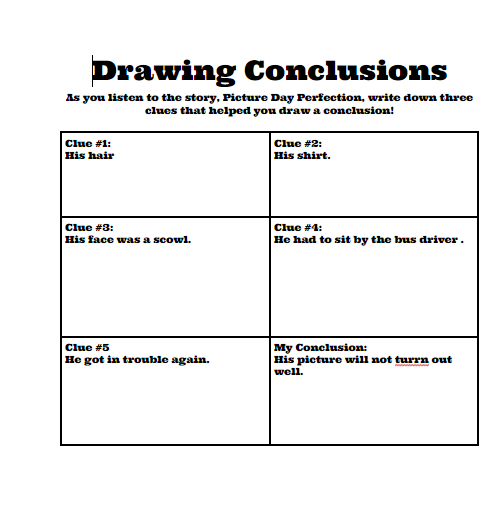
To end the lesson I read aloud Picture Day Perfection by Deborah Diesen. Before even reading the text, I had a student draw a conclusion from the title and picture. Her thought already was his picture was going to be far from perfect. As I read the story aloud, we would stop and pull clues from the story that would lead us to think his picture was going to need retaken another day. Using 5 clues, we drew our final conclusion! I won't ruin the end of the story for those of you who haven't read it! 
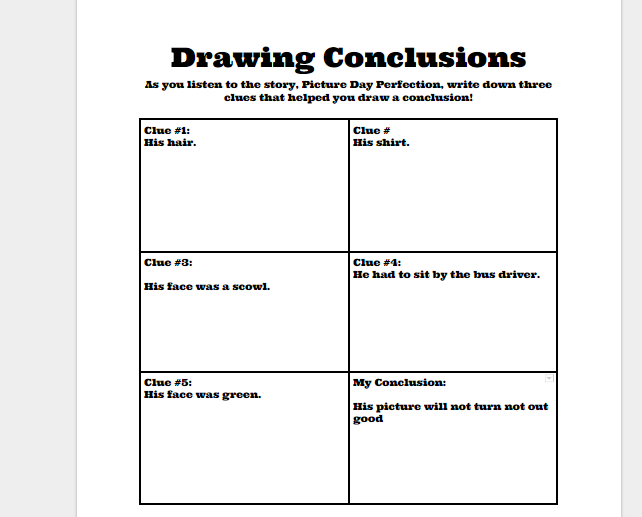

Here is a Link to the Drawing Conclusions Template: Drawing Conclusions

 If you make a copy, you can change for any book or text you like! 


Tuesday, April 24, 2018

1st Grade Compare and Contrast

1st Grade Compare and Contrast

Today I had the opportunity to go into Mrs. Kiel's 1st grade classroom and do a lesson on comparing and contrasting. To begin the lesson, we start with an anchor chart to define compare and contrast, as well as use it to practice using a Venn Diagram, which would be the tool we would use to compare and contrast in today's lesson.


In our lesson, we also incorporated the use of Google Classroom. Students used Google Classroom to Link to our next two stories: The Boy Who Cried Wolf by B.G. Hennessy and The Boy Who Cried Bigfoot by Scott Magoon. We came back as a class to compare and contrast the two stories together using the Venn Diagram. 

The last part of our lesson allowed for the students to link to Miss Nelson is Missing by Harry Allard and then complete a Venn Diagram on Google Slides. Mrs. Kiel's students are still using the 30kiel login so I had a little more work upfront creating a document for each student(probably 5 minutes). However, the kids LOVE the ability to use Google and interact with the document. From the teacher standpoint, you can comment back to students and give feedback that way! Below, you will see how that looks on Google Classroom if you create a document for all students. The words were given to the students to compare and contrast and they moved them to the correct spots on the Venn Diagram.


Tuesday, March 27, 2018

Kindergarten Google Classroom

Kindergarten Google Classroom

Yesterday I had the opportunity to go into Mrs. Smith's Kindergarten classroom. We were comparing two stories: My Lucky Day and The Wolf's Chicken Stew by Keiko Kaska. I also introduced her class to Google Classroom. They already have so many computer skills that navigating through Google Classroom proved to be easy for them. I used Google Classroom to post the link to both stories on Youtube so they could listen to them. 


After each story was read, we did an interactive sequencing using Google Slides. One issue with using the 30smith is that all students access the same document and it cannot be accessed by all individual students. However if you want to do something interactive with Google Slides you would just assign the students a number and they would go to that slide and that becomes their work space (as long as they stay on their slide #). They did great for their first time using Google Slides and Google Classroom and LOVED how they could move the pictures to complete the activity. We finished the lesson using the Comparing Literature chart from Smekens. 


Friday, March 9, 2018

Kindergarten Rekenrek

Kindergarten Rekenrek Lessons

This week I had the opportunity to visit all our kindergarten classrooms and introduce them to the Rekenracks and work on number sense. We started the lesson by exploring the Rekenracks and the number of beads on the top, number of beads on the bottom, the number of red beads, and the number of white beads. After introducing to the students, they each received their own Rekenreks and were shown a number to show on their Rekenreks. Students were then called up to the board to explain their thinking on the teacher Rekenrek.


We ended the lesson by using the website Dreambox. It will flash a Rekenrek quickly and then the students have to show the number on their individual rekenreks. We started with numbers to ten and then moved to numbers to 20. Since it flashed quickly, the numbers to 20 really tested their number sense and use of the Rekenreks. Our K teachers will be implementing these into stations over the next weeks.  


Wednesday, February 21, 2018

4th Grade Yes MA'AM

4th Grade Yes MA'AM

I had the opportunity to visit Mrs. Castetter's 4th grade classroom. Our lesson focused on Yes, MA'AM. To begin the lesson we talked about when we would use a YES, MA'AM response--when the question asked us to use evidence from the test to support our thinking. Our article was titled, "The Magic Button Box". After reading the article and question, we restated the question in our own words.
Next the students went back in the text and highlighted 2 details to support their claim.
                      
We then typed those into our response using sentence starters that the class had already brainstormed.

We ended our response with our closing sentence. We talked about using the phrases, "this proves" or "this is why" to start our last sentence and ending it with what we were proving. 


Monday, February 12, 2018

1st Grade Drawing Conclusions

1st Grade Drawing Conclusions

Today I had the opportunity to visit Mrs. Murphy's first grade classroom. We worked on drawing conclusions from stories (both in pictures and words). To begin the lesson, we talked about how readers draw conclusions, using clues from a story and our background knowledge. 

Next we looked at pictures to draw conclusions. The students used turn and talk and then told me what they saw in the picture and the knowledge they already knew to make there conclusion.
                                                            
The students saw that the feet were burnt. Their final conclusion was the person had stayed in the sun too long and did not put enough sunscreen on. 
See all the pictures we used to make conclusions: Drawing Conclusions

After that activity we used Google Classroom. Mrs. Murphy's students are just starting to learn to use Google Classroom and they did a GREAT job of reading the riddles, typing their answers, and turning them into me. 
                                        

To end our lesson on Drawing Conclusions, the students worked on Case Files which each had a different story that allowed the kiddos to work together and draw conclusions. At the end of the lesson, we had some groups share their story, there final conclusions, and the clues that led them to make their final conclusion. 


Friday, February 9, 2018

4th Grade Math Constructed Response

4th Grade Math Constructed Response

Today I had the opportunity to visit Mrs. Beavers's Classroom and use the ISTEP constructed response tool with her classrom. Our problem focused on finding area of an irregular figure and finding the perimeter with missing sides. 

We started the lesson by allowing the students 10 minutes to work on the problem on their own to simulate an ISTEP type environment. After the ten 10 minutes were up, we worked through the problem together and finishing typing there problems on the Test Nav Tool.  We first discussed the differences in part A and part B--Part A was asking for area, Part B was asking for perimeter. Students showed the 2 different ways they divided the figure to make two rectangles. We then discussed that we would have to change the dimensions of the original figure to fit just the rectangle we were finding the area of. Lastly, we practiced finding the perimeter, when all the sides are not given. We knew Mr. White needed a fence to keep the rabbits out. This lead to the discussion of how to find the missing sides. 
                       

We had a very teachable moment at the end of the 10 minutes of working on their own.
This 4th grade student had AWESOME work and an explanation.....on her paper. After the 10 minutes was up, I asked her if she got all of it typed in and she said no! I told her I was so proud of her answer, but I wanted to see her just type her answer. I used this whole class and said to just use the paper when you are solving the problems. When it comes to your explanation, use your computer and type in our answer, eliminating a step and saving yourself time.