Friday, March 15, 2019

Kindergarten CVC Words

Kindergarten CVC Words


This week I had the opportunity to visit our Kindergarten classrooms and do a lesson on reading and writing CVC words. To begin the lesson I defined our focus: Kindergartners can read CVC words and Kindergartners can spell CVC words. We used the anchor chart to the right to begin our lesson. I had students repeat the learning focus as we moved to the different sections on the anchor chart. I also covered up the pig and the net so that our focus was on blending sounds and getting our mouths ready to say the sounds in the word. 


We then used Google Classroom to link to Google Slides for the students task. The students were asked to read cvc words and drag and drop pictures that matched the cvc word. The second part of the task on Google Slides was for the students to build cvc words. Students were given the letters and then asked to drag and drop them into the correct boxes. 
Here are some pictures from the lesson:


This is pictures of how the Google Slide Activity looked:


CVC Anchor Chart
CVC Google Slide Activity 

Friday, March 8, 2019

4th Grade Main Idea Versus Theme

4th Grade--Main Idea Versus Theme and Constructed Response Using Google Classroom

This week I had the opportunity to visit our fourth grade classrooms and model a lesson on Main Idea versus Theme and Construed Response using Edulastic.

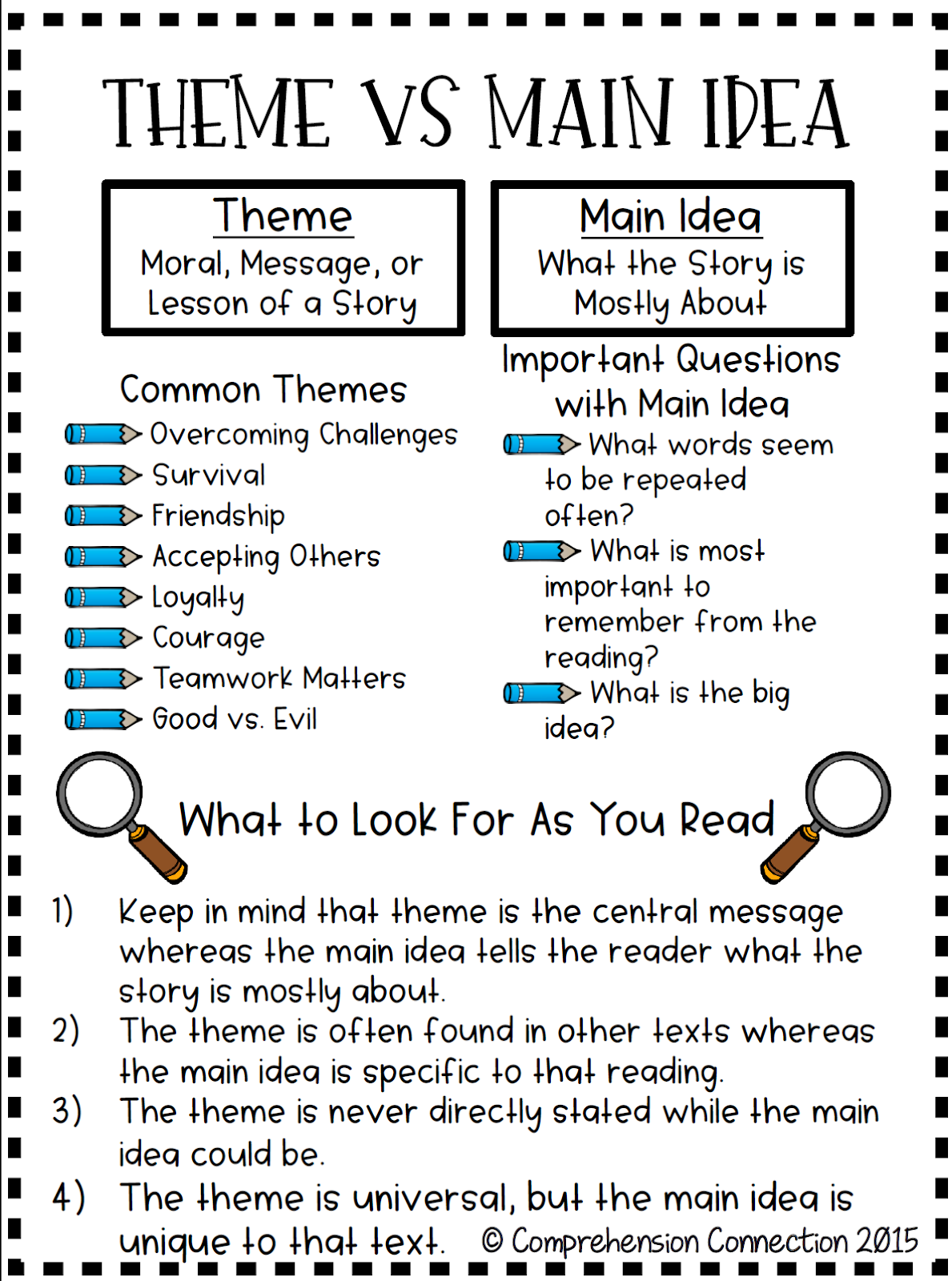
The main idea lesson started off with using an anchor chart. It allowed us to look at the differences between main idea and theme. It also pointed out how our readers can determine the difference between the two. 

We used the passage "A Tricky Monkey" to pull Theme and Main Idea from. Using Edulastic allowed for students to practice the drag and drop feature and hot text feature they will see on ILEARN. 


The other lesson I did in 4th grade this week focused on using Edulastic to write a constructed response after reading an article. I pulled the article: Issue Overview: Should we have Zoos? from Newsela and copied it right into Edulastic. You can do the same with all the questions and answers.


Issue Overview: Zoos Edulastic (Qs and CR)
Issue Overview: Zoos Edulastic (Only Constructed Response)
Theme Versus Main Idea: Edulastic


Main Idea Versus Theme

3rd Grade Main Idea Versus Theme

This week I had the opportunity to visit our third grade classrooms and model a lesson on Main Idea versus Theme. To begin the lesson, we used an anchor chart to talk about the differences between the two. We also used a common story that many of the students were familiar with: The boy Who Cried Wolf. We talked about the lesson that the boy learned and the main idea. 

Students then used Google Classroom to Navigate to Edulastic. Edulastic was used as a teaching tool to show students some different forms of questions they will see on ILEARN: drag and drop, hot text, and passage with questions to the right. 

Passage:
Did you know you can copy and paste any Newsela or ReadWorks article into Edulastic? Then you can create questions that will show up to the right of the passage (Which looks exactly like ILEARN)!

Drag and Drop Questions:
Our students are use to these types of questions. They see these on Lexia and iReady. 

Hot Text Questions:
This is a new type of question on ILEARN. Students are able to select group of words in a text as their answer choice. Check out the assignment on Edulastic. 


Friday, February 22, 2019

Edulastic

Edulastic

Yesterday, I had the opportunity to use Edulastic in Mrs. Beavers 4th Grade Classroom. We were continuing our work with construed response. This gave the students a very ILEARN like look using Edulastic! 
I made this example. I had some front end work of typing up the article into the space, but it allowed the students to view the passage and question at the same time!
Here is a student response (found on Google Classroom):


Some Great Things About Edulastic:
>Syncs with your Google Classroom.
>Tech Enhanced Questions for ELA and Math
>Practice the new "Hot Text" Question

Edulastic is not the most user friendly especially when it comes to assigning to Google Classroom. 
View this Google Doc to See Directions: Edulastic/Google Classroom


1st Grade Fact and Opinion

Fact and Opinion

This week I had the opportunity to Co-Teach with Mrs. Hildreth in first grade. Our lesson focus was on teaching the difference between fact and opinion. Before the lesson was taught Mrs. Hildreth and I collaborated together on ideas beforehand. Mrs. Hildreth started the lesson using a fact and opinion video. It defined the different facets of each and at the end had a try it section. We used turn and talk and had students share what they were learning throughout the video.
Next we looked at a picture and had the partners come up with different facts and opinions. We shared out at the end and let the students decide if the student was saying a fact or opinion. We had the students reference the anchor chart when needed! 

At the end of the lesson, we used Google Classroom and Google Slides to link to an interactive Fact and Opinion Sort. Mrs. Hildreth took her "pull-out" group and sat with them during this portion. This allowed her to have the students read and repeat the sentences being read. The students enjoyed using Google Slides and the interactive document. 


Kindergarten Rekenrek

Rekenrek

This week I had the opportunity to visit Mrs. Moffett's classroom. We used the Rekenrek to practice number sense, addition, and subtraction. I began the lesson by allowing the students to explore the rekenrek as they wanted and see the different color beads. I then started questioning how many beads in each row, the number of red beads, and the number of white beads (etc.). I then started with showing a number and the students showed them on their rekenreks. I called on students to come up and show how they showed the number on their rekenreks! We repeated this activity several times and did the same for addition and subtraction.
The second day I returned and we used a link through Google Classroom to get to an online Rekenrek. The students haven't used Google Classroom much, and I was impressed with how well they did navigating to the correct places. The online rekenrek allows you to add as many rows of beads as needed and also allowed students to write on the screen. We again practice showing numbers, addition problems, and counting by tens! The students LOVED using Google Classroom and the online Rekenrek. 
Link to Online Rekenrek

Thursday, February 7, 2019

Making An Inference

Making An Inference

Today I had the opportunity to visit Mrs. Beaver's room to continue practicing our Yes! MA'AM constructed response and practice making an inference. Students were given the task to read the article, The Snowman. After reading, there task was to make an inference on "How does Mya feel when she sees snow out the window?" They were asked to use details from the text to support there answer. After reading the task, we talked about the word inference and how they will see this word on ILEARN. An inference is using details from the text + their knowledge. To help us see the steps we used Roz Linder's Silhouette to stick on the details in the text that would show how Mya felt. Students marked up the text as we posted these on the silhouette!

We then moved on to writing our constructed response. While working on these, it allowed myself, Mrs. Beavers, and Mr. Forkert to go around and have conversations about their constructed response. See some of the students examples below


Here are the links if you want to try this in your classroom: